
QIMA WeChat Mini Program
Easier to schedule tests, track orders, and check reports.
Easier to schedule tests, track orders, and check reports.
Our lab testing services are now fully available on the Mini Program.
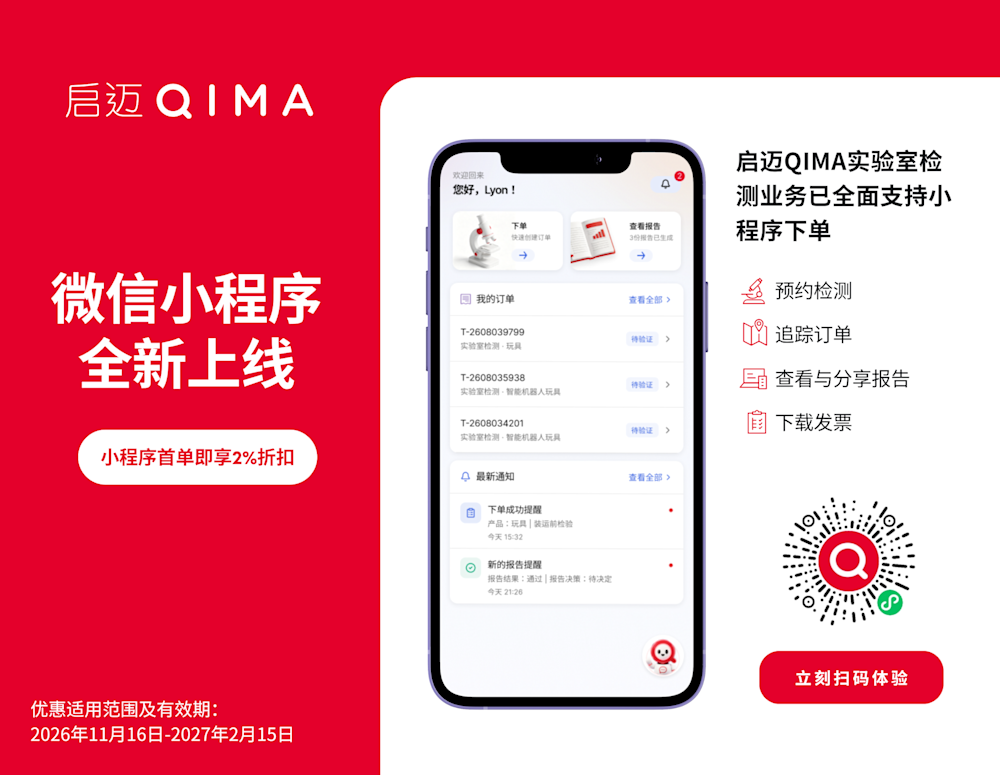
QIMA has launched its official WeChat Mini Program to bring a simpler mobile service experience for lab testing customers. This new digital entry for QIMA customers in China puts test booking, order management, test reports, quotations and invoices all in WeChat, so you can manage your testing work more easily.
Submitting a new request? Send photos, files or voice notes - our AI helps identify the information. You can provide product and testing details via text, photos, documents or voice messages. Whether you are checking samples at a factory or selecting products while travelling, you can submit your testing request on your phone.
If you are still developing or sourcing products and do not have samples yet, you can upload reference photos or specifications to ask for a quotation and testing plan in advance.
Placed similar orders before? Copy your past order. You can create new lab testing orders for new products directly in the Mini Program.
For products you have tested before, copy an old order to avoid filling in the same information again.
After booking a test, you can view the status and progress of your order anytime. When the report is ready, preview or download it online - no need to look through emails or chat records.
You can also find quotations and invoices under each order. Save all these documents in the Mini Program and share them easily with your colleagues or factory partners.
If you already have a myQIMA account, there is no need to sign up again. Log in with your current account. Your existing information, past orders and documents stay connected.
You can bind your WeChat account after logging in. Once bound, you will get WeChat alerts for order confirmation, progress updates and completed reports, and you can log in faster next time.
New users can register directly in the Mini Program. After activation, you can log in and start using the service.
Two ways to access it:
Scan the official QR code in this page
Search for “启迈QIMA” in WeChat
Place your first order on the Mini Program and get an extra 2% discount with your screenshot. Offer valid: 16 Nov 2026 – 15 Feb 2027.
If you run into any issues when using the Mini Program, please contact us directly by filling in the form on the right.
You’ll find all the answers you’re looking for in the FAQ below. Otherwise, you can reach out to us contact us, or message your dedicated QIMA Account Manager on WeCom, and you’ll get a reply as soon as possible.
The QIMA WeChat Mini Program is an AI-powered mobile tool built right inside WeChat. Without opening a desktop browser, you can submit lab test bookings through conversational AI or a simplified form, scan courier waybills, review quotations, track real-time testing progress, and download final test reports anytime, anywhere.
The core difference lies in AI-powered smart assistance and mobile convenience: myQIMA Web uses a standard web form workflow designed for manual, field-by-field entry on a desktop computer.
The QIMA WeChat Mini Program features built-in AI tools that let you book tests by taking a photo, uploading a document, or sending a voice/text message. The AI automatically extracts product details, categories, and tracking info to fill in the form for you - while giving you full mobile access to quotes, live order status, and reports on the go. Both channels connect directly to the same QIMA laboratory system.
Existing myQIMA users: No re-registration is needed. Simply log in and link your existing myQIMA account with one click - all your orders and reports will sync automatically.
First-time online users: You can create and activate your account directly inside the QIMA WeChat Mini Program (available in both Chinese and English) in a few steps.
No. The QIMA WeChat Mini Program and all of its built-in AI tools are completely free to use. Your testing fees and billing terms remain exactly the same as your existing QIMA account.
What files or photos can I upload? You don’t need to prepare a standardized spreadsheet beforehand. Simply provide whatever information you have at hand:
Upload photos or files: Take a photo of your sample or care label, or upload spec sheets and past forms (supports PDF, Excel, Word, and JPG/PNG in both Chinese and English).
Voice or text chat: Describe your request naturally in chat (e.g., "Children's polyester jacket, ship to Shanghai lab").
The AI automatically extracts the product name, category, lab location (Dongguan, Shanghai, or Hangzhou), and sample quantity into structured fields for you to review.
Yes. If your product is still in the sourcing or development stage and you don't have a physical sample yet, you can upload a reference product image or specification sheet to submit an inquiry and get a pre-quote in advance.
Add tracking later: You can submit your booking first to get your order number, and come back anytime to add the courier company and tracking number once the sample is shipped.
AI waybill scan & one-tap copy: Instead of typing long tracking numbers, snap a photo of your shipping label and the AI will fill it in automatically. You can also copy your QIMA Order ID in one tap to label your sample package easily.
Yes. All your documents are organized in one place - no more searching through scattered email threads or chat histories:
Order-level quotations: View the official quotation file tied to each specific order directly inside the order details page.
Live tracking & reports: Check real-time status (Sample Received / In Testing / Report Ready) and preview, download, or share PDF reports right from your phone.
Search by product name: Quickly find past reports by searching for the product name as well as the report number.
Not at all. For identical products, you can duplicate a past booking in one tap using Reorder. For similar new products, our AI automatically recognizes related items from your order history during chat and offers to pre-fill your preferred lab location, supplier, and contact details.
You never have to worry about making a costly mistake. First, the AI recommends the appropriate category based on your product photo or documents and hides irrelevant form fields. Second, every submission is reviewed and verified by QIMA’s professional Lab team before testing officially begins - if anything needs adjustment, our team will confirm it with you first.
The AI is designed to save you 80% of the typing effort, while you always stay in control. Any field that requires closer attention will be highlighted, and you can freely review and edit every detail on the confirmation screen before submitting - or tap to reach human support anytime.
Absolutely. Whether you are at a factory taking sample photos, at a trade show requesting a pre-quote, or commuting when a report comes out, you can manage the entire workflow from your phone inside the QIMA WeChat Mini Program.
Yes! You can forward the QIMA WeChat Mini Program card directly to colleagues or WeChat groups. To keep your business data secure and confidential, each user logs in with their authorized account and can only view orders, quotes, and reports permitted under their account.
Al ponerse en contacto con QIMA usted acepta nuestra política de privacidad y nuestros términos y condiciones.